Best Whatsapp Tricks And Hacks 2017 (Top 16+)
Since we all know about whatsapp, the popular and widely used messenger application on smart devices. With the Popularity of smartphone and specially android Phones, the use of social networking sites and messengers apps has increased.
Everyone prefers to use smartphones because of their features like High Quality camera, Full touch support, high storage, Fast Internet with 3G, 4G support and its huge App Store that provide a large number of applications according to user requirements. Android devices rather provide smart features at reasonable cost.
Since whatsapp is most popular messenger apps for smartphone. Because of this, there are many hidden whatsapp tricks and hacks. By using those easy yet effective whatsapp hacks we can easily use many advance features which are not officially provided by whatsapp. Normally whatsapp provide features like group chat, video calling, chatting, file sharing etc.
But due to some limitation on all these we use tricks to make best use of things. While we have already posted many whatsapp tricks and hacks in separate articles. We today here we are going to list all those best whatsapp hacks and tricks. So choose any of the best according to your need.
List Of Best Whatsapp Tricks And Hacks.
1. Dual Whatsapp Account On Same Device.
It is possible to make dual whatsapp with the help of our amazing whatsapp tricks. Whatsapp official App does not allow you to use two whatsapp account at same time even our phone support dual sim mode. Still, it is possible with the help 3rd party apps.
If you also want to enjoy dual whatsapp account on your android device. Then you must look up at whole step by step guide for dual whatsapp. To use it visit.
Read Here:- Hack Alexa Rank

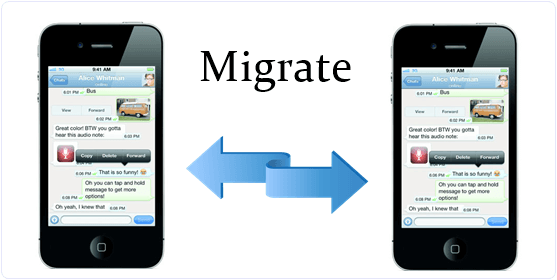
2. Migrate Whatsapp Account From One Phone To Other.
Since you have bought a new Android phone and want to shift your Whatsapp Account from old phone to new phones. Then follow this amazing whatsapp trick steps before installation whatsapp into your new phone.
1. Open the file manager of your old Android phone.
2. Find the Whatsapp folder and open it.
3. Then, find database folder and copy its all files to PC.
4. Now install Whatsapp in your new Android phone and copy all files in database folder inside the Whatsapp folder.
2. Find the Whatsapp folder and open it.
3. Then, find database folder and copy its all files to PC.
4. Now install Whatsapp in your new Android phone and copy all files in database folder inside the Whatsapp folder.
3. Download Whatsapp On PC Or Laptop.
Since we know whatsapp is for smart device but the most common problem faced by whatsapp users is that, there is no PC version or application is release by official.
But don’t worry because there are many whatsapp tricks to use whatsapp on web. From which one officially introduced by whatsapp which also requires mobile connection.
Method 1:- We can rather use whatsapp on PC with the help of bluestacks. Bluestacks is an emulator version of Android which create virtual Android environment on computer device.
Therefore, we can easily install android apps on PC. With the help of bluestacks we can also download and install Whatsapp. If you want to know how to do then checkout
Read Here:- Best & Free Photo Editing Apps
Method 2:- Alternative Method is use whatsapp web version on web.whatsapp.com. After visiting the website scan its QR code with your Android device and synchronize your account with PC. To do all this task
- First of all, we need Google Chrome browser.
- Internet Connectivity on both devices.
- Then Open whatsapp on mobile and click on the option of Whatsapp Web available in menu bar.
- Then scan QR code from web.whatsapp.com
- Within few second whatsapp will start working on web.
- This will be stay connected until whatsapp connectivity will not be stopped on mobile.

4. Change Whatsapp Font.
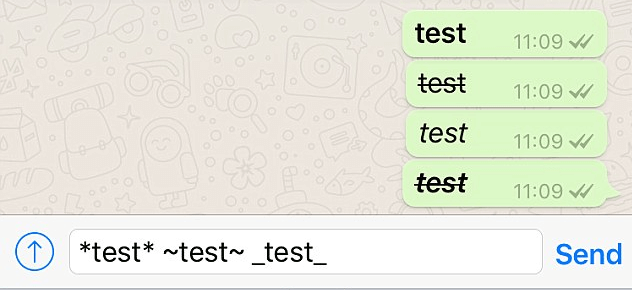
Whatsapp now allows its users to make changes in font style while sending messages to others. But most users don’t know about this trick yet. You can make your font bold or rather italic in a whatsapp message. Given below is a syntax for making changes in whatsapp font.
Bold : add asterisks on either side. your text here
Italics : add underscore on each side. your text here
Strike through : add tildes on each side of the text. ~your text here~
Italics : add underscore on each side. your text here
Strike through : add tildes on each side of the text. ~your text here~
5. Refer To A Message Within Whatsapp Chat.
Sometimes it’s rather confusing to mention a particular media or text in a long chat. People often get confused because photos get mixed up while uploading and downloading. Therefore, to solve this problem, there is a simple whatsapp trick that will sort you out.
To refer to a particular image or text, just long press on the message. Then, from the options available on the top bar of the screen, tap on the arrow mark towards the left. Now you can see the message being referred in the typing box.

6. Hide Whatsapp Profile Picture.
Yet another great hack in collection of Whatsapp hacks. Whatsapp also provide increased security features in its new version. Sometime it is necessary to communicate with others without showing our profile picture.
This feature is available in new version of Whatsapp so to enjoy this feature download new version of whatsapp. To hide your profile picture follow these steps.
1. Open your Whatsapp Messenger and open the Settings option.
2. Now you see the privacy option.
3. Then, click in the privacy option. You will see different privacy option.
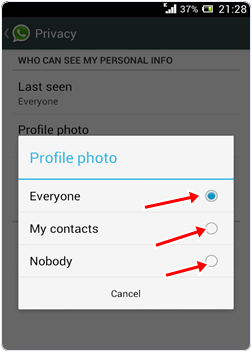
4. Look for the Profile Picture option.
5. Now select the one of the three options as seen below in the image.
2. Now you see the privacy option.
3. Then, click in the privacy option. You will see different privacy option.
4. Look for the Profile Picture option.
5. Now select the one of the three options as seen below in the image.
7. How To Lock Whatsapp Account.
It is also an amazing trick in all whatsapp tricks which helps to lock your whatsapp account to provide more security to your messages and information. Sometime your smartphone is shared by your friends and relatives.
So if you do not want they use your whatsapp account then you should lock it with a password. To lock your account follow these steps.
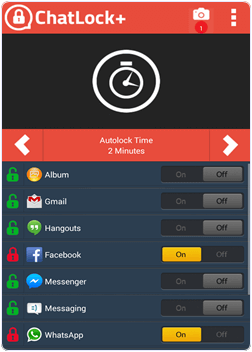
1. Download and install Messenger and Chat lock from Google Playstore or by clicking the button below.

2. Then, you can lock the various messengers including Whatsapp with auto lock time using different password for different messengers.
8. Recover Whatsapp Deleted Messages.
Another most helpful in all Whatsapp tricks and hacks. Sometime we accidentally delete our whatsapp messages but these messages are important to us, Therefore, we need to get back that message again.
Whatsapp provide backup of your all messages and conversion in phone memory so we can recover our old messages again. Follow these steps to recover deleted messages.
1. Uninstall Whatsapp and reinstall it After sometime.
2. At the installation time you it will ask to restore all your history, Data, Messages and click Ok.
3. After re-installation you will get all you messages again.
2. At the installation time you it will ask to restore all your history, Data, Messages and click Ok.
3. After re-installation you will get all you messages again.
If you want to learn more possible ways to recover deleted whatsapp messages then i recommend to read below given article.
Must Read:- Top 10 Indian Porn Stars
9. Change Whatsapp Number With Deleting Account.
You can change your Whatsapp number linked with your Account. Normally users Uninstall and reinstall the Whatsapp to change their number on Whatsapp account. But it is a silly option and time consuming.
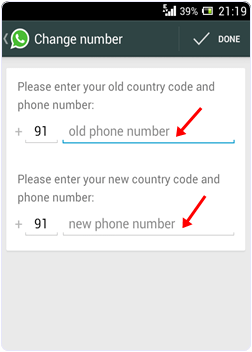
Whatsapp provide facility to change your number just with few clicks. If you wan to change then follow this amazing whatsapp hacks for changing your account number.
Go to settings >> Account >> Change Number. Now you have to fill your old number and new number.
10. Disable Whatsapp Blue Last Seen Ticks.
This is really an amazing in all whatsapp tricks and hacks. Last seen feature is a good features which tell you friends with date and time you are last seen on whatsapp.
Sometime to make it tricky so that nobody know about your last seen time or some time we do not want to talk with someone then we have to close this feature. We use third party software from play store previously to stop that feature. But now Whatsapp provide that feature to on or off. Follow these steps to use this feature.
1. Open your What App messenger.
2. Go to settings and open Account.
3. Now look for the privacy option and click on Last Seen.
4. Now select last seen for everyone, for My Contacts or Nobody.
2. Go to settings and open Account.
3. Now look for the privacy option and click on Last Seen.
4. Now select last seen for everyone, for My Contacts or Nobody.
11. Turn Off Automatic Download Of Videos From Whatsapp.
This is really great in all whatsapp hacks to save internet data. Using Whatsapp your friends and relatives send you the audio, video, images. Whatsapp download this audio, video files automatically.
Some we do not have enough data balance and or we want to download video files with our choice to save our storage and data balance. We can turn off or change automatic download settings. To change this setting follow this step.
1. Open your Whatsapp Messenger and open the Settings option.
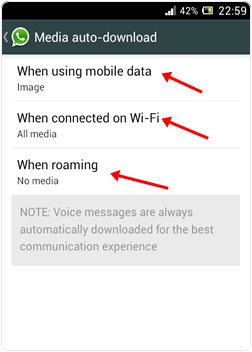
2. Click on the Chat setting and look for auto download Media.
3. Now you find the three option as shown in the image below choose one of them.
2. Click on the Chat setting and look for auto download Media.
3. Now you find the three option as shown in the image below choose one of them.
12. Share Pdf, Doc, Apk And Other Files On Whatsapp.
Whatsapp is a messenger apps which allow us to send text, images and videos to all contacts. Whatsapp support limited media files and we cannot send different extension files through whatsapp. As we common use whatsapp to send screenshot via whatsapp just because its an easy way to do. But the most common problem faces by users is when they want to share any pdf file, doc file or other web based or even android apk files which are not supported by whatsapp. This is really helpful in all whatsapp tricks and hacks. So if you want to learn how to share these types of files on whatsapp easily then here the best possible method.
Read Here:- Android Horror Games
13. How To Hide Images & Videos From Phone Gallery
We receive many images from our friends and relatives. Many times these whatsapp images are shown in your phone gallery where we do not want to see it. In phone gallery we placed our important images. But whatsapp images getting confused with this images. So we have to avoid these images and videos to appear it from the gallery here are the best possible ways.
Read Here:- Most Beautiful Womens of the World
14. Check Whatsapp Statistics.
Whatsapp become a very popular way of time passing by chatting with others and share files with others. Everyday we spend a lot of time on the Whatsapp.
If you want to know about how much time you spend on whatsapp and you also can get all the information of your account related to message sent, received, Data sent within few clicks. Follow these steps.
1. Download and install whatsapp on your Android device by clicking the button below.
Explore its various option to know about your last week, last month data usage, Messages and time spend per day.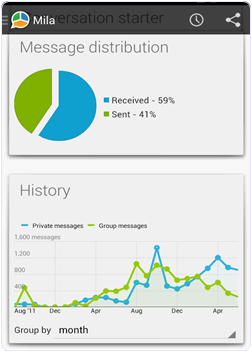
15. Extend Whatsapp Trial Pack Or Use Whatsapp For Lifetime.
Another amazing in list of whatsapp tricks and hacks to extend package period. After the installation Whatsapp offer you one year trial period for free.
After one year you to pay $0.99 to extend your usage period for one year more. It is compulsory to pay. But we provide you a trick to save your money and extend your period to one year more. Follow this steps.
1. Delete your Whatsapp Account for this. Go to Settings >> Account >> Delete My Account.
2. Find any of your friend having smartphone but not installed whatsapp yet. Then Create new whatsapp account on his or her mobile phone. It is just a five minutes task.
2. Find any of your friend having smartphone but not installed whatsapp yet. Then Create new whatsapp account on his or her mobile phone. It is just a five minutes task.
16. Use Whatsapp Without Mobile Number.
Use a Whatsapp account without a number is yet another trick in all best whatsapp tricks and hacks. Some time we also need to hide our identity to talk with a stranger. With the help of this whatsapp hack we can use whatsapp account without number.
If you want to know step by step procedure to make this type of account then you should read our previous article.
 So these are few best working whatsapp tricks and hacks which are helpful. These Whatsapp tricks will make experience more better. No doubt there are many other possible ways and best tricks available for whatsapp. But we try to list all the best whatsapp tricks which are working.
If you have any problem while using any trick or have suggestions or any useful whatsapp trick which we had missed out. Then don’t feel any kind hesitation while share it in below comments.





 It is also a best app in the list of photo editing apps for android which is available on Google play store for free. It has a rating of 4.3 on Google play store. We can easily edit, crop, rotate, resize, frame and clone our images with The help of this tool. Users can also easily adjust color with hue, saturation, contrast and brightness. We can also share images with our friends using Email, FB, Twitter etc. Approximately 50 million user download this App.
 It is another popular app in the list of photo editing apps for android. We can easily create collage with our Images. It provide hundreds of frames and layouts to choose from. We can easily apply effects and filters to our images. It provide simple touch gesture to rotate, resize and flip our images. We can also share them on Social media. Approximately 50 million user download this App.
 It is also a good choice in photo editing apps for android platform. This Android App provide us a tool to create beautiful photo collage and photo grids. After saving our photo collage is ready to to share. We can easily paint our photos with same colors and convert then to black and white images. We can easily draw and add text to our photo. It provide 40 different frames, 37 filters and 20 texture filters. Approximately 50 million user download this App.
 Photo Editor Pro is another high rated app in the list of photo editing apps for android. It has a rating of 4.5 on Google play store. It is free to download. We can easily edit our photos with amazing effects, filters, frames etc. Users can also control color and brightness of our images. We can also add text and stickers to make our image more attractive. Photo Editor Pro require Android 4.1 or higher version. Approximately 0.5 million user download this Game.
 Aptitude Test and Preparation is an android app for aptitude preparation. This app provide more than 600 question for practice. Questions are arranged according to topic wise. It also provide formulas for various topic. This app is designed for CAT, MAT, GMAT, SAT etc aptitude tests. This app also provide logical reasoning questions. It also provide details solution of difficult question. Approximately 1 million users downloaded this app.
 Aptitude Trainer is an aptitude app with easy to use interface. It is a light weight Android app. This app provide 1000 plus question with proper explanation. This app has two different mode training mode, test mode. In test mode we can judge our performance on the basis of score. With the help of this app we can clear all the quantitative exam like SAT, CMAT, CAT and bank exam. It is popular in all aptitude apps for android. Approximately 5 lakh users downloaded this app.
 Aptitude Plus is an android aptitude app which is specially designed for all types of aptitude test, mathematics, logical reasoning tests. It is simple and easy to use Android app which provide awesome quality User interface. We can prepare bank exam, MNCs aptitude test, Govt test etc without buying any book. This app also provide mathematical formulas and detail solution of a problem. Approximately 1 lakh users downloaded this app.
 Aptitude Question and Answer is another popular aptitude app which is available on Google play store for free. It provide question for logical reasoning, aptitude, mathematics and verbal reasoning. This app is a light weight and simple to use Android app. It is good choice in all aptitude apps for android. This app cover all the questions for Campus placements, bank tests and Govt jobs. Approximately 5 lakh users downloaded this app.
 Aptitude for quantitative Exam is another best in all aptitude apps for android to do preparation of test. This app also cover all the topics of general aptitude of all the quantitative exams like RRB, IBPS etc. We do not need to buy any book for aptitude preparation. It is a light weight android app which provide simple and easy to use interface. It is also compatible with all Android version starting from 2.3. Approximately 1 lakh users downloaded this app.
 .IndiaBix Aptitude is an online Android Aptitude app which provide more than 3000 questions of general Aptitude of different topics for practice. It provide regular update of its questions. It is helpful for the examination of CAT, SAT, MAT, IBPS, Clerks and Banking jobs. This app requires Android 3.0 or higher version. Approximately 50 thousand users downloaded this app.
 Aptitude Test Preparation is an awesome offline Android app for Aptitude preparation. It regularly update its questions. It provide more than 1000 questions for practice. This app also arrange its question according to category wise. We can also select questions from a particular category in which we are weak. This app provide detail solution of all questions. Approximately 50 thousand users downloaded this app.
 Quantitative Aptitude Formula is an Android app which provide Aptitude tricks and tips to solve the multiple questions within few minutes. This app also include the online testing mode through which we can Test our performance on the daily basis. This app provide multiple choice questions with easy to use interface. We can easily clear the quantitative exam for banks and Govt jobs. Approximately 1 lakh users downloaded this app.
 Engineering Aptitude is another Android app which is specially designed for Engineering students. This app focus on the multiple choice questions. This app contain a mixture of basic engineering questions, communication skills, mathematics and logical reasoning. It is an easy to use app which provide detail solution of difficult questions. Approximately 50 thousand students downloaded this app.
 GATE is an android aptitude and GATE Exam preparation app which is available on Google Play store for free. This app mainly focus on the Engineering Mathematics and Aptitude. Out of hundred marks aptitude and mathematics contain 30 marks paper. This app also contain previous year GATE question paper for practice in all engineering streams. Approximately 50 thousand users downloaded this app.